
Events
Events Overview
Events in OneCore extend the core content system by enabling the creation and management of time-based entries such as meetings, conferences, workshops, promotions, open days, or local happenings. The Events feature builds on the same flexible architecture used for listings and directories, while adding event-specific data such as dates, recurrence, and location.
Events can be managed entirely from the Joomla administrator interface and displayed on the frontend in list, grid, calendar, or map-based views, depending on configuration.
Purpose of Events
The Events system is designed to support a wide range of use cases, including:
-
Business or community events
-
Training sessions and workshops
-
Promotional or marketing events
-
Real estate open houses
-
Local or regional event directories
By combining structured event data with custom fields and media, OneCore Events can adapt to both simple and advanced event-management scenarios.
Event Creation and Editing
Creating or editing an event follows standard Joomla editing patterns, ensuring a familiar workflow for administrators.
An event consists of:
-
A title and URL alias
-
Start and end date/time to define the event duration
-
A rich-text description for detailed information
-
Category and content associations for organization
-
Publication status and access level controls
All changes made in the event editor directly affect how the event is presented on the frontend.
Event Dates and Time
Each event includes a required start date and time, along with an optional end date and time. These values determine when the event is considered active and how it is displayed in chronological listings or calendars.
This time-based structure allows OneCore to accurately sort, filter, and display upcoming, ongoing, and past events.
Recurrence Support
OneCore PLUS Events includes built-in recurrence support, allowing administrators to create repeating events without duplicating entries. This feature is ideal for regularly scheduled activities such as classes, meetings, workshops, or ongoing programs.
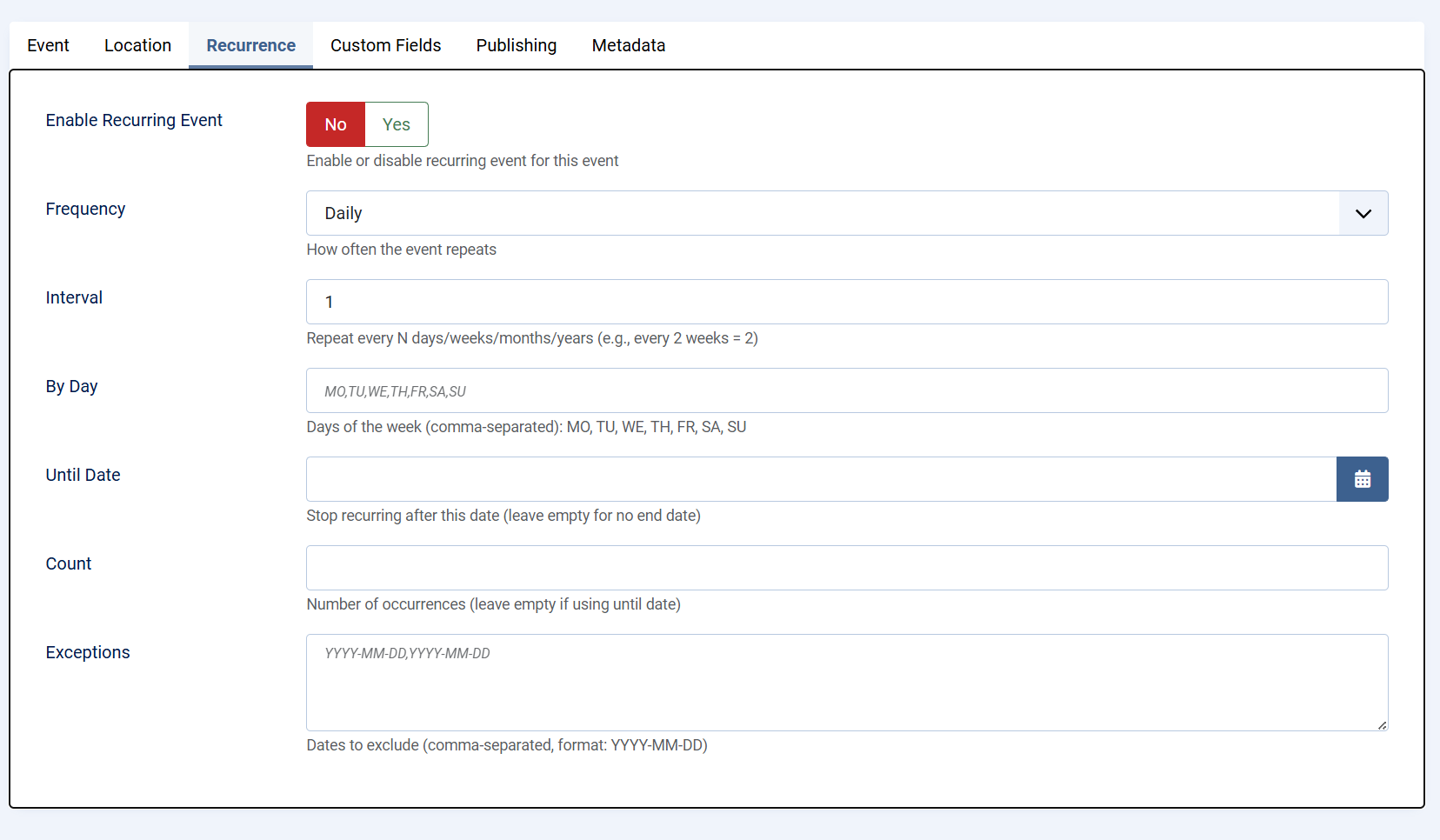
Enable Recurring Event
When recurrence is enabled, the event is treated as a repeating series rather than a single occurrence. Administrators can enable or disable recurrence at any time, giving full control over whether the event repeats.
Frequency
The frequency defines how often the event repeats. Available options include daily, weekly, monthly, or yearly repetition. This setting establishes the base pattern for the recurring event.
Interval
The interval determines how often the selected frequency is applied. For example:
-
Interval set to 1 repeats the event every day, week, month, or year
-
Interval set to 2 repeats the event every two days, weeks, months, or years
This allows flexible scheduling without creating multiple rules.
By Day
For weekly recurrence, specific days of the week can be selected using standard weekday codes:
MO, TU, WE, TH, FR, SA, SU
Multiple days can be defined using a comma-separated list. This is useful for events that occur on multiple days within the same week, such as classes held every Monday and Wednesday.
Until Date
The Until Date option defines when the recurring event series should stop. Once this date is reached, no further occurrences will be generated. Leaving this field empty creates an open-ended recurring event.
Count
As an alternative to using an end date, the Count option limits the recurrence to a specific number of occurrences. Once the defined number is reached, the event series automatically ends.
Exceptions
Exceptions allow individual dates to be excluded from the recurrence pattern. This is useful for skipping holidays, cancellations, or special cases without modifying the overall recurrence rules.
Together, these recurrence options provide precise control over repeating events while keeping event management simple and efficient.
Custom Fields Integration
Events fully support OneCore custom fields, enabling administrators to extend event data with structured information such as:
-
Registration details
-
Ticket prices
-
Speaker or organizer information
-
Event-specific metadata
Custom fields must be assigned to a custom field group linked to the Events entity in order to appear in the event edit screen.
Media Support
Events can include images to enhance visual presentation. Media is commonly used for banners, promotional graphics, or venue photos and can be displayed in both event listings and detail views.
Rich media improves engagement and helps events stand out in crowded listings.
Location and Map Integration
Events can be linked to a physical location, allowing them to be displayed on maps and filtered by geographic area. This is particularly useful for local events, venues, or multi-location event directories.
Location data enables map-based browsing and improves discoverability for users searching by area.
Publishing and Access Control
Each event includes standard Joomla publishing controls, allowing administrators to:
-
Publish or unpublish events
-
Schedule visibility using dates
-
Restrict access based on user groups
These controls ensure events are visible only to the intended audience and at the appropriate time.