
Custom Fields Group
Custom Field Groups
Custom Field Groups in OneCore are used to organize related custom fields and control where and how those fields are displayed. A field group acts as a container that defines visibility, context, and layout placement for all fields assigned to it.
Field groups must be properly configured and published in order for their fields to appear in content or event edit forms and on the frontend.
Group Details
Title and Description
-
Title
The name of the field group. This title can optionally be displayed in the frontend, depending on display settings. -
Description
An optional description that explains the purpose of the group. This can also be shown or hidden based on configuration.
Entity Assignment (Visibility)
Entity Type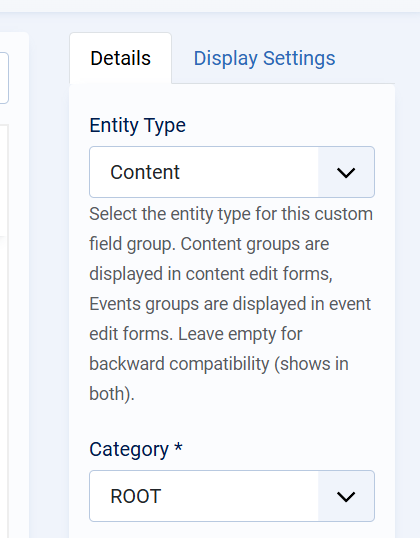
The Entity Type determines where the field group is available:
-
Content
The group and its fields appear in standard content (listing/article) edit forms. -
Events
The group and its fields appear in event edit forms. -
Empty (Backward Compatibility)
If no entity type is selected, the group will be visible in both Content and Events.
Only field groups assigned to the correct entity type will be visible when creating or editing items of that type.
Category Assignment
-
Category
Defines the category scope in which the field group is available.
UsingROOTmakes the group available globally, while selecting a specific category limits visibility to that category and its children.
Display Options
Show Title
Controls whether the group title is displayed on the frontend.
Show Description
Controls whether the group description is displayed on the frontend.
Ordering
Defines the position of the field group relative to other groups. Lower values appear first.
Status
Only Published field groups are active and visible. Unpublished groups and their fields are hidden from both backend forms and frontend output.
Display Settings
The Display Settings tab defines where the field group is rendered on the frontend. These settings apply to all fields within the group.
Position (Items List)
Controls where the group is displayed in list or grid views (for example, category listings).
-
Under Intro Text
The group is shown below the item’s intro/summary text.
Position (Single Item)
Controls placement when viewing a single content item or event.
Position (Module)
Controls how the field group is rendered when used inside a module.
-
Allows the same group to be reused consistently across different module-based layouts.
Publishing Rules and Dependencies
For custom fields to appear correctly:
-
The field group must be published
-
The field group must be assigned to the correct entity type
-
The custom fields within the group must also be published
-
The group’s display settings must match the active layout (list, single item, or module)
If any of these conditions are not met, the group and its fields will not be visible.
Best Practices
-
Create separate field groups for Content and Events to keep structures clear.
-
Use Display Settings to avoid cluttering main content areas.
-
Place informational or secondary fields in the sidebar for better readability.
-
Use ordering to control the logical flow of information.